Multi-Channel Product Handling
Parallel channels separate, orient, rotate or stabilize products for repeatable imaging. AICIM configurations reach up to 7,200 capsules per minute; capacity depends on the product and selected model.
Purpose-built optics, AI and pattern recognition work with product handling and rejection for pharmaceutical and nutraceutical quality control. Imaging and inspection settings are matched to each product and machine configuration.
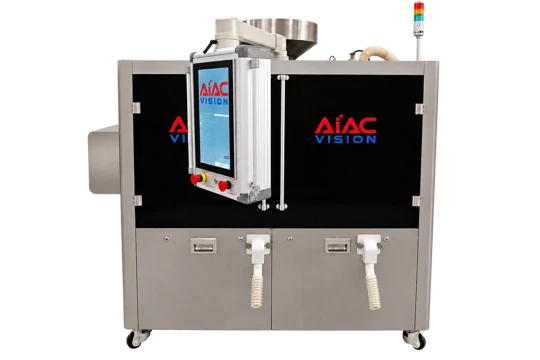
In-house imaging, inspection algorithms and controlled product handling work together for repeatable inspection.
Parallel channels separate, orient, rotate or stabilize products for repeatable imaging. AICIM configurations reach up to 7,200 capsules per minute; capacity depends on the product and selected model.
For the capsule configurations described in our brochure, multiple views and three lighting environments can capture up to 30 images per capsule. Imaging is selected for the required surfaces and defects.
Print Compensation and Glare Removal help address print interference and reflections. Character Inspection evaluates markings, while Photometric Stereo Vision reveals surface detail. The applicable methods depend on the product and configuration.
Coordinate defect decisions with product rejection. Available reject images, defect distributions and inspection records help teams review settings and investigate production issues.
AIACVISION develops its own inspection software, imaging methods and product-handling technology. This supports application-specific configurations and continued development.
U.S. Patent US 12,646,153 B2 covers our capsule seam imaging technology. We continue to file patent applications for our proprietary technologies as part of our ongoing innovation.
Imaging coverage, algorithms, record availability and throughput vary by equipment model and project configuration.
Different products need different lighting, viewing angles and image acquisition. The optical setup is matched to the product and the defects you need to detect.
Multi-view imaging for capsule surfaces, with optical configurations suited to opaque, transparent, empty and liquid-filled formats.
Product handling and imaging expose the tablet surfaces needed for inspection across different shapes and coatings.
Lighting is selected for product shape and transparency, helping reveal defects in the shell and contents.
Inspection stations and lighting are configured for the product side, foil side and printed information on a blister pack.
Deep learning and pattern recognition provide complementary tools. The method is chosen for the defect, product variation and inspection requirements.
Train models with representative images and defect annotations for varied visual appearances and new defect types.
Use defined inspection criteria for measurable features such as dimensions, shape and product appearance.
Product handling, image acquisition, defect evaluation and rejection need to work together. The inspection sequence is configured for the machine and its position in your line.
Feed and position the product for the required views.
Synchronize cameras and lighting with product movement.
Set inspection criteria, save product recipes and switch recipes for changeover.
Apply the selected recipe and defect criteria.
Act on the decision using the configured rejection system.
Standalone inspection, integration with processing equipment, and vision modules for blister packaging or counting lines.
Prepare for repeat production with saved recipes, clear inspection feedback and practical cleaning and setup procedures.
Review machine status, counts and rejection results through organized operator screens. Save and recall product-specific recipes; English and Spanish interfaces are available on supported configurations.
Configure Pattern Recognition settings and assign trained AI models to a recipe. Use acceptable products and known defects to evaluate criteria and understand rejection results.
Accessible product-handling and product-contact components support changeover, cleaning and routine checks. Fit applicable change parts, select the recipe and follow the selected equipment procedures.
After initial setup or changeover, run representative samples to verify handling and inspection. Review detection and false rejects before routine production begins.
AIACVISION’s in-house control and inspection software supports recipe management, production monitoring and inspection records.
Store product-specific inspection settings and switch recipes during changeover.
Review defect images and inspection statistics to understand production results.
Control user permissions and record relevant operations.
Keep inspection records and export reports for production review.
Use the AIACVISION Online AI Deep Learning Platform for annotation, training, validation and deployment.
Connect inspection information with controlled operation and your production workflow.
Available functions include individual user accounts, role-based permissions, time-stamped audit trails, batch and inspection records, export and session controls. Electronic signatures, retention, backup and record protection are reviewed for the agreed configuration.
Define the exchange of product and batch identifiers, inspection counts, rejection summaries, status and alarms. Recipe coordination, start/stop signals, level signals and interlocks are engineered for the agreed project scope.
21 CFR Part 11 implementation depends on system configuration, validation, procedures and customer administration. MES protocols, data fields, transfer direction and interruption handling are confirmed with customer engineering, IT and quality teams. A software version or configuration supporting 21 CFR Part 11 is available as an optional purchase and is provided when selected by the customer.
Share your product, target defects and inspection requirements. Sample evaluation helps determine the imaging setup, inspection criteria and equipment configuration.
Product-specific recipes connect imaging, defect criteria and rejection decisions. Evaluate changes using representative products and defect samples before production use.
Machine configuration and inspection coverage depend on the product and process. Counting modules, full-surface inspection machines and partial-surface sorters have different roles.
Imaging coverage depends on the machine. AISIM inspects both faces and the sidewall; BASM-12 offers partial-surface screening; counting modules inspect camera-visible surfaces.
Recipes match product appearance and defect criteria. Review imaging and handling conditions when the product changes.
Inspection results drive the configured rejection workflow. Full machines and counting modules have different handling and rejection arrangements.
AIACVISION technology includes Print Compensation, Glare Removal, Character Inspection and Photometric Stereo Vision. Applicable imaging and algorithms are selected for the product and machine configuration.
Available account controls, role-based permissions, audit trails and electronic inspection records support project-specific implementation of applicable requirements. Configuration, validation, procedures and customer administration determine the implementation.
Yes. Product and batch data, counts, rejection summaries, status and selected control signals can be engineered for the agreed project scope. Protocols, data fields, interruption handling and interface testing are confirmed with customer engineering, IT and quality teams.
Tell us your product format, target defects and required capacity. We will help you evaluate the next step.